Posts

Showing posts with the label TIBCO

Parsing a JSON String and Converting it to XML in TIBCO
Image
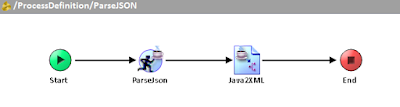
If you have the REST & JSON Plug-in for TIBCO BusinessWorks, parsing and rendering a JSON string into XML is a straightforward task. We are often using XML in TIBCO, because XML is the most common format that is used to transform data using XSLT and XPath language. There are two ways we can parse and render JSON text: using an XML Schema, and using Java classes. Of course, XML Schema is already very handy, as we can always easily create one in TIBCO Designer. But, before we go to why we need to use Java classes, we need to examine first the nature of an XML Schema. An XSD describes the XML document in a strictly structured manner, which means that the sequence and nesting of the elements are important. However, for JSON, we cannot rely on the order of the elements, and we cannot force JSON to be that way. It’s just its character, and it maintains itself as an unordered collection of zero or more name/value pairs. That said, we cannot expect a JSON message to conform to the sp...


Specifying Custom Engine Properties in Designer

Image
Specifying custom engine properties in TIBCO Designer can either be done by modifying the designer.tra, or by creating a properties.cfg file. The advantage of the latter is that you don't have to restart TIBCO Designer every time you need to change the value of the property. Also the properties.cfg overrides the value of the engine properties you have specified in designer.tra . You can comment out the property by prepending a hashtag (#) to the property. Before loading and running the process in Designer tester, you need to specify the full file path to your properties.cfg file. Here are some of the common engine properties: #Enabling web service authentication via LDAP java.property.com.tibco.bw.security.login.jaas=true java.property.java.security.auth.login.config=jaas.conf java.property.TIBCO_SECURITY_VENDOR=true java.property.com.entrust.toolkit.security.crypto.random.DRBGusingSHA512=true #Salesforce Connection Forward Proxy Configuration java.property.co...

How To Map Password Type Global Variable In Activity Input

Image
As you may already know, you cannot map a global variable that is a password type to the Activity Input. You can only map it to a Shared Configuration resource when possible. One way to retrieve the global variable password value is to write a Java code. But there is another preferable way to have one less activity in your process definition, and that is using a Java Custom Function. Of course, you will still write Java code one time, but it's a whole lot reusable; and you can export it as a Project Library that you can use in a different Designer project. So you want to write a Java code, but you are not quite sure which JAR file the Java class is located; on the other hand, you know the fully qualified name of the class and the method name to invoke. Personally, I find it appropriate to use The Reflection API to write a few lines of code in order to achieve this. We want to have a function that retrieves the value of a password global variable passing the global variable path ...

How to Fix the SSLProtocolException: handshake alert

You might have probably encountered the following error when invoking a web service over HTTPs transport using SoapRequestReply activity. "javax.net.ssl.SSLProtocolException: handshake alert:  unrecognized_name" This could be a weird error especially if you know that the client certificates are valid, and you have installed the complete certificate chain in your keystore. In order to resolve this, you need to add the following property in the application .TRA file. java.property.jsse.enableSNIExtension=false I don't have an exact explanation for the root cause of this error, but I believe this is brought about by one of the the security enhancements in Java SE 7. "Server Name Indication (SNI) for JSSE client: The Java SE 7 release supports the Server Name Indication (SNI) extension in the JSSE client. SNI is described in RFC4366. This enables TLS clients to connect to virtual servers."

Creating Java Custom Functions

Image
You can create custom XPath functions that you can directly use in the Activity Input. These functions come very handy especially when you expect to use them repeatedly for mapping. You can do that by creating a Java Custom Function shared resource. You will have to write a Java class that has a public and static method and returns a value. The method cannot be void or explicitly throw an exception. Supposed you want to have a custom function that replaces all occurrences of a string with another string. This is, in my experience, a common function that is not readily available in TIBCO BW because it doesn't support XSLT 2.0; it's limited to XSLT 1.0. But it allows us to write a Java method and call it via XSLT! To demonstrate that, we can have a Java method that accepts three parameters: the input text, the regular expression or pattern, and the replacement text. I have named this method "replaceRegex" but it could be any descriptive name. I used the String...

Reassign stdout and stderr to BW logger

There are instances when you are using a third party Java class and you want to debug certain errors, but you couldn't get the error stack traces in the logs particularly in the application logs which you can also view via TIBCO Administrator (assuming you have no server-level access). There's no way you can change the Java class to add a custom log4j logger such as "bw.logger" in order to write into the BW log file. You know for certain that the Java class writes debug logs into the standard output and error stream (e.g. System.out and System.err). You can reassign standard and error output stream and into the BW log file by writing a custom Java code. Since these are static methods and a service instance runs in its own JVM, you only have to run this code once as part of a process starter (process definition with onStartup). Create a static Logger object (class org.apache.log4j.Logger). private static final Logger logger = Logger.getLogger("bw.log...

Dynamically Mapping Fields from Salesforce Query Activity Output

Image
While I was working on Salesforce.com integration, the TIBCO BusinessWorks plug-in provides a "Query All" and "Retrieve All" activities to query Salesforce objects. The "Query All" lets you use a SOQL statement freely, while "Retrieve All" only allows you to specify the list of fields and optionally the object IDs. The only filter you can use for the latter are the object IDs, which doesn't seem to be the case most of the time. Both activities have a generic output and are not specific to a particular Salesforce object. It has an "any element" field which you can coerce based on a specified schema and you would need a WSDL file generated from Salesforce to do this. However, the problem starts when Salesforce keeps on updating the WSDL at the same time, so you will need to map the newly added field all the time! The solution I have come up with for this dilemma was not actually quite that simple but it offers more flexibility in th...

My First Mule Project

Image
Mule is an integration software I have tried to learn recently. It has an Eclipse-based development environment, and since my work experience is mostly about integration, I kind of felt that I would not have a hard time learning the software. Its development environment Mule Studio offers two approaches to develop the integration code: using the visual editor and the XML editor. With the visual editor, you can drag and drop configurable resources; each of which has a specific function. The XML editor offers a convenient way for developers to modify configurations without opening Mule Studio. Mule is quite reminiscent of TIBCO BusinessWorks, but one of its apparent strengths is that it offers a variety of out of the box functions for integrating with other platforms without using adapters or custom code. Well, I have tried my luck and developed my first Mule project. Upon creating a new project, all the necessary folders and configuration files are automatically added to the project. T...

Service Oriented Architecture and Service Orchestration

Image
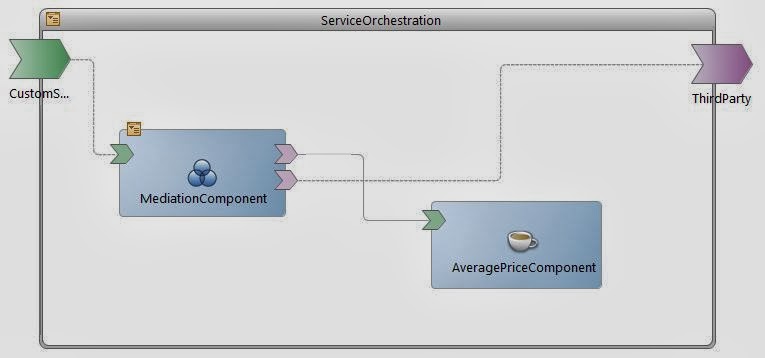
Service-oriented architecture (SOA) is a software design principle which allows an application to be exposed as an independent service that can be accessed and reused by one or more applications. Two applications interact through an interface which defines the message exchange pattern and the service contract in order to establish communication successfully between them. It is a great concept that separates implementation logic from the data definitions and allows modularity of programs that can be treated as “silos”--which means they can be developed separately at the same time without any dependencies. More of it on http://en.wikipedia.org/wiki/Service-oriented_architecture . Service orchestration is a concept closely related to SOA which allows services to be arranged and organized into workflows. It enables independent services to interact and talk to each other to achieve an automated end-to-end process. It is often compared to an orchestra in which different musical instrum...

Using the Java Event Source in TIBCO

Image
There are some palette resources we never or rarely use in TIBCO, and one of them is the Java Event Source. This activity is used to create a custom process starter in the process definition. I wonder what would be the use case to customize a process starter. Is there ever a functionality not available in TIBCO out-of-the-box? Nevertheless, I have gone exploring this function which also led me to some advanced topics in Java. So, this is how Java Event Source looks like. You have two options when writing the code: you can modify the embedded source code in Designer or you can use an external class. Your external class needs to extend the abstract class JavaProcessStarter from the package com.tibco.plugin.java and export it as a jar file, which is kind of cumbersome since you need to include the external library in the class path so that you can compile the code. Preferably, writing the code in Designer is more convenient. Conversely, what if writing the logic itself is mor...

Running Deployed Application Outside TIBCO Administrator

Image
There are times when you don't have full access to TIBCO Administrator but you have full access to the UNIX server where the application was deployed and you wanted to start an application. You can do that on the terminal by running the shell script that is automatically created upon deploying the application. Go to < TRA_DOMAIN_HOME> : /tibco/tra/domain/<DOMAIN_NAME>/application/<APPLICATION_NAME> APPLICATION_NAME is the name you have given to the Enterprise Archive resource in your Designer project. After deploying the application, a script file and a TRA file are created into this path. You can also check it on TIBCO Administrator and it is part of the Deployment Name after the dash. You can directly run the shell file as a separate process (by using ampersand), or you can issue the following: <TIBCO_BW_HOME>/bwengine --run --pid --propFile <PATH_TO_APPLICATION_TRA_FILE> There is one downside to using the shell file since it creates a d...

Creating Web Services in TIBCO

Image
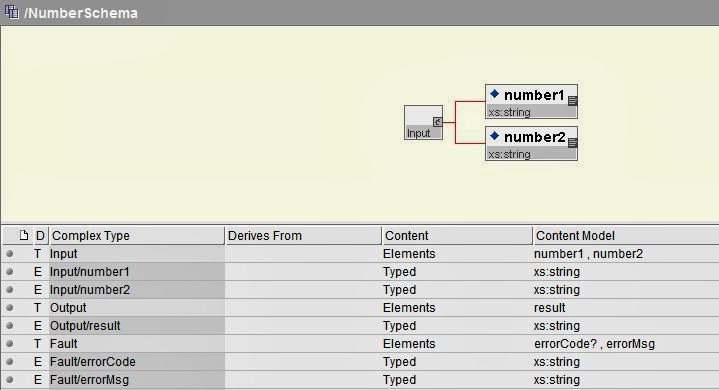
Web service is a standard and reliable way of communication between two applications over the Internet. It is a secure way of exposing functions that a client application can use without revealing the internal mechanism of the providing application. For example, you want to get a list of all items from a store which have a name that starts with letter A. You send a request to the providing application specifying the operation and you get a response that is the list of all items. You are not certain whether the records came from a file, a database, or another cloud application. As long as you correctly specify the request in the format expected by the provider, the rest of the details are unknown to you. This is how the exchange of information works with web services. A protocol agreed by both the provider and the client needs to be established. The protocol is the set of rules the caller of the web service needs to follow in order to invoke the web service successfully. Most common of...