Posts

Showing posts with the label BW

Parsing a JSON String and Converting it to XML in TIBCO
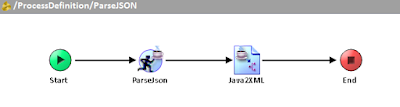
Image
If you have the REST & JSON Plug-in for TIBCO BusinessWorks, parsing and rendering a JSON string into XML is a straightforward task. We are often using XML in TIBCO, because XML is the most common format that is used to transform data using XSLT and XPath language. There are two ways we can parse and render JSON text: using an XML Schema, and using Java classes. Of course, XML Schema is already very handy, as we can always easily create one in TIBCO Designer. But, before we go to why we need to use Java classes, we need to examine first the nature of an XML Schema. An XSD describes the XML document in a strictly structured manner, which means that the sequence and nesting of the elements are important. However, for JSON, we cannot rely on the order of the elements, and we cannot force JSON to be that way. It’s just its character, and it maintains itself as an unordered collection of zero or more name/value pairs. That said, we cannot expect a JSON message to conform to the sp...

Specifying Custom Engine Properties in Designer

Image
Specifying custom engine properties in TIBCO Designer can either be done by modifying the designer.tra, or by creating a properties.cfg file. The advantage of the latter is that you don't have to restart TIBCO Designer every time you need to change the value of the property. Also the properties.cfg overrides the value of the engine properties you have specified in designer.tra . You can comment out the property by prepending a hashtag (#) to the property. Before loading and running the process in Designer tester, you need to specify the full file path to your properties.cfg file. Here are some of the common engine properties: #Enabling web service authentication via LDAP java.property.com.tibco.bw.security.login.jaas=true java.property.java.security.auth.login.config=jaas.conf java.property.TIBCO_SECURITY_VENDOR=true java.property.com.entrust.toolkit.security.crypto.random.DRBGusingSHA512=true #Salesforce Connection Forward Proxy Configuration java.property.co...

How to Fix the SSLProtocolException: handshake alert

You might have probably encountered the following error when invoking a web service over HTTPs transport using SoapRequestReply activity. "javax.net.ssl.SSLProtocolException: handshake alert:  unrecognized_name" This could be a weird error especially if you know that the client certificates are valid, and you have installed the complete certificate chain in your keystore. In order to resolve this, you need to add the following property in the application .TRA file. java.property.jsse.enableSNIExtension=false I don't have an exact explanation for the root cause of this error, but I believe this is brought about by one of the the security enhancements in Java SE 7. "Server Name Indication (SNI) for JSSE client: The Java SE 7 release supports the Server Name Indication (SNI) extension in the JSSE client. SNI is described in RFC4366. This enables TLS clients to connect to virtual servers."

Creating Java Custom Functions

Image
You can create custom XPath functions that you can directly use in the Activity Input. These functions come very handy especially when you expect to use them repeatedly for mapping. You can do that by creating a Java Custom Function shared resource. You will have to write a Java class that has a public and static method and returns a value. The method cannot be void or explicitly throw an exception. Supposed you want to have a custom function that replaces all occurrences of a string with another string. This is, in my experience, a common function that is not readily available in TIBCO BW because it doesn't support XSLT 2.0; it's limited to XSLT 1.0. But it allows us to write a Java method and call it via XSLT! To demonstrate that, we can have a Java method that accepts three parameters: the input text, the regular expression or pattern, and the replacement text. I have named this method "replaceRegex" but it could be any descriptive name. I used the String...

Reassign stdout and stderr to BW logger

There are instances when you are using a third party Java class and you want to debug certain errors, but you couldn't get the error stack traces in the logs particularly in the application logs which you can also view via TIBCO Administrator (assuming you have no server-level access). There's no way you can change the Java class to add a custom log4j logger such as "bw.logger" in order to write into the BW log file. You know for certain that the Java class writes debug logs into the standard output and error stream (e.g. System.out and System.err). You can reassign standard and error output stream and into the BW log file by writing a custom Java code. Since these are static methods and a service instance runs in its own JVM, you only have to run this code once as part of a process starter (process definition with onStartup). Create a static Logger object (class org.apache.log4j.Logger). private static final Logger logger = Logger.getLogger("bw.log...