Posts

Showing posts with the label Mule

Supported Media Types in Mule
Image
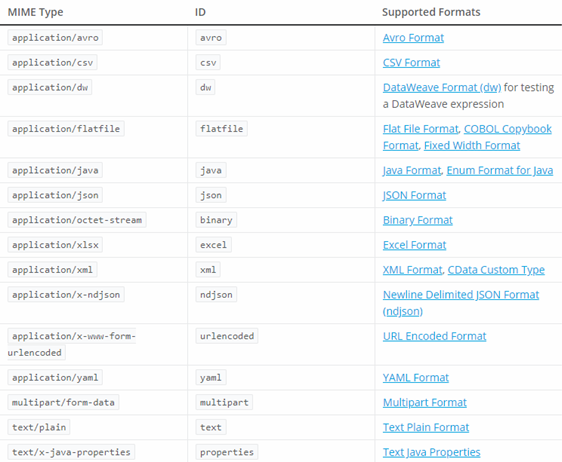
 What is a Media Type?        Media Type is also known as MIME type, which stands for Multipurpose Internet Mail Extensions. It is a two-part identifier for file formats and contents transmitted over the Internet. Since APIs are network applications that are using the HTTP transport, media types are the identifiers that describe the request and response format that the API consumes and produces. You can indicate the media type in these HTTP headers: Content-Type and Accept. A common example of a media type is text/html; charset=UTF-8 , wherein text is the type and html is the subtype, which may also have optional parameters such as charset that indicate the character encoding, e.g. Unicode (8-bit, 16-bit), ASCII, etc.     Mule supports a lot of media types, not just XML or JSON. As per the MuleSoft documentation, below are the supported media types:     The great thing with Mule is that it is data agnostic, as long as you use one of the medi...

XML Schema and JSON Schema Validation in Mule 4

Image
Exposing an API to be consumed by client applications entails a lot of challenges. Apart from a good API definition and documentation, you also need to ensure that the request payload submitted to your API endpoints are valid and conforms to the expected data structure. Although it is not required, I think some of the advantages to validate a request payload are: Establish a service contract which is a form of agreement between the service provider and the service consumer. This means that, in order to successfully consume an API, a client application needs to strictly follow a specification "for the request payload" called a data schema . Establish data integrity which ensures that all incoming data submitted to the API are "in a format that is expected". It doesn't make sense to process malformed data. For instance, if you are inserting data to a relational database, it would be more beneficial to first check mandatory (or required) fields before processing th...

My First Mule Project

Image
Mule is an integration software I have tried to learn recently. It has an Eclipse-based development environment, and since my work experience is mostly about integration, I kind of felt that I would not have a hard time learning the software. Its development environment Mule Studio offers two approaches to develop the integration code: using the visual editor and the XML editor. With the visual editor, you can drag and drop configurable resources; each of which has a specific function. The XML editor offers a convenient way for developers to modify configurations without opening Mule Studio. Mule is quite reminiscent of TIBCO BusinessWorks, but one of its apparent strengths is that it offers a variety of out of the box functions for integrating with other platforms without using adapters or custom code. Well, I have tried my luck and developed my first Mule project. Upon creating a new project, all the necessary folders and configuration files are automatically added to the project. T...